AI Fat Filter & Chubby Face Effect
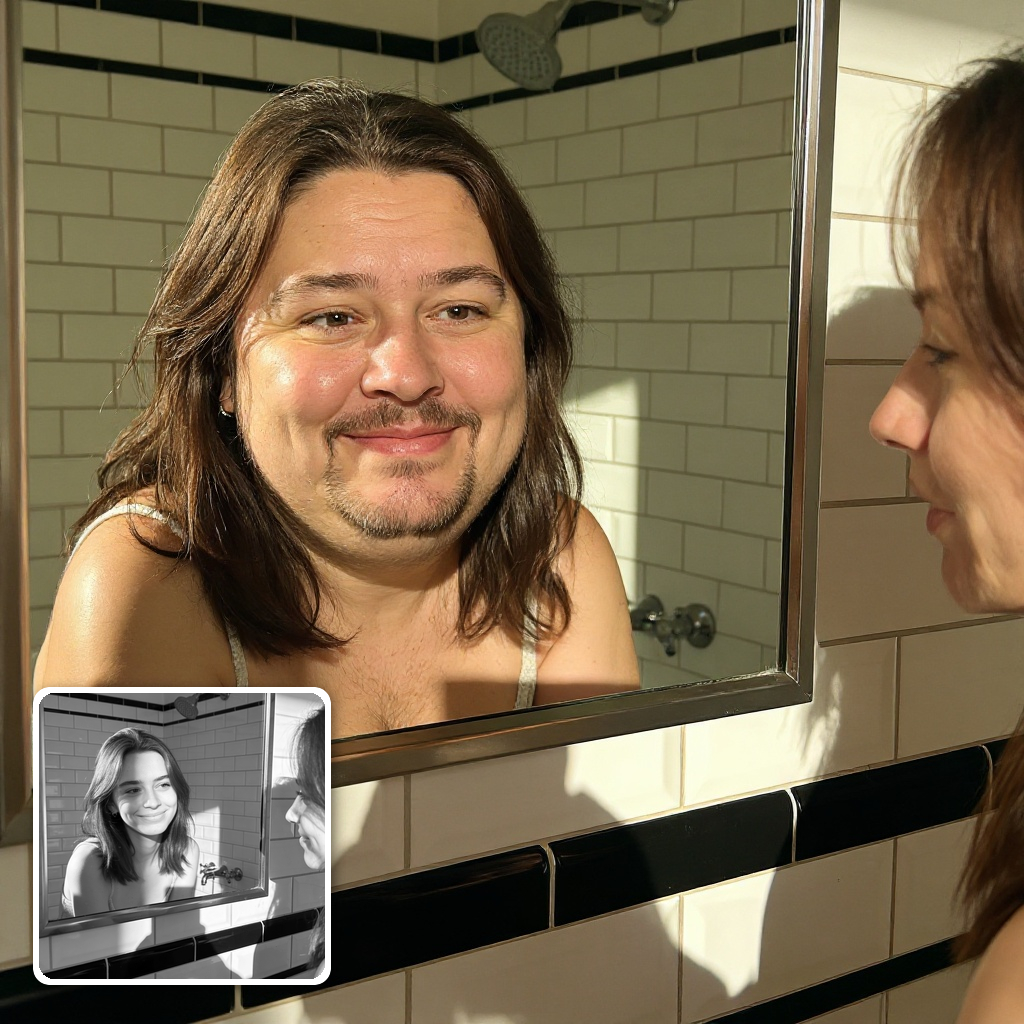
See a fun, chubbier version of any face in one click. Upload a photo and the AI fat filter fills out the cheeks, chin and jawline photorealistically — a fat face filter that keeps the person recognizable, their expression intact, and the background untouched.
AI Fat Filter
Drag image here, click to browse, or paste from clipboard
Max size: 5MB


Example results
A Fuller Face That Is Still You
The AI fat generator adds rounded cheeks, a plumper double chin and a heavier jawline while preserving your eyes, smile and identity. Friends instantly recognize the person — that's exactly what makes the result funny instead of fake.




Photoreal Edit, Untouched Background
Powered by the Seedream V5 edit model, the fat filter re-renders only the face: lighting, skin texture and the entire background stay exactly as shot. No smudged edges or stretched pixels that give away a warped photo.
HOW TO
How to Make Someone Look Fat in a Photo
Upload a Clear Portrait
Drop in a well-lit photo where the face is clearly visible. Front-facing shots of a single person give the funniest, most realistic fat filter results.
Let the AI Fat Filter Work
The AI analyzes the face and photorealistically fills out cheeks, chin and jawline — expression, lighting and background stay untouched. One generation costs 14 credits.
Download & Prank Your Friends
Your chubby face effect is ready in around 20 seconds. Download the HD result and drop it in the group chat — then try it on everyone else.
One Click vs. Manual Face Warping
What the AI fat filter does automatically used to take real editing work.
AI Fat Filter on ImgEditor
- One upload, done in ~20 seconds — no editing skills needed
- Photoreal cheeks, double chin and jawline rendered by AI
- Identity, expression, lighting and background fully preserved
- HD download you can post straight to the group chat
Photoshop Liquify / Warp Apps
- 20+ minutes of pushing pixels per photo
- Stretched skin and smudged backgrounds give it away
- Faces stop looking like the actual person
- Paid software and a real learning curve
Warping tools move pixels around; the AI fat filter re-renders the face itself. That's why AI results survive a close look — the skin texture, shadows and proportions all stay photographic.
What People Make with the Fat Filter
The classic uses — from group-chat pranks to content that gets shared.

Prank the Group Chat
The #1 use case: run your friends, partner or teammates through the fat face filter and drop the results in the chat. Because the person stays perfectly recognizable, the reveal lands every time.

Memes, Thumbnails & Reaction Content
Creators use the AI fat generator for reaction thumbnails, before/after gags and meme templates. The photoreal quality reads clearly even at thumbnail size — no explanation needed.
Just Curious How You'd Look
Plenty of people simply wonder "what would I look like with a fuller face?" Upload a selfie and find out in seconds — it's a fun, harmless way to see a different version of yourself.
Pro Tips for the Best Fat Filter Results
Five photographer-tested tricks to get the funniest, most believable chubby transformation on the first try.
Start with a sharp, front-facing photo
The AI reshapes cheeks, chin and jawline — it needs to see them. A clear, well-lit face looking at the camera beats artistic side angles every time.
Skip beauty filters on the source photo
Photos already smoothed by beauty apps confuse the edit and produce plastic-looking skin. Feed the fat filter an unedited original for natural texture.
Keep glasses and hats off if you can
Accessories that cover the cheeks or jaw limit how far the transformation can go. Bare faces get the full double-chin treatment.
Try a few different expressions
A big grin, a neutral stare and a mid-laugh shot each produce a completely different kind of funny. Generate two or three and pick the winner.
Save the original for the reveal
The laugh comes from the side-by-side. Post the before and after together — or send the edited photo first and let the group chat figure it out.
FAQ


